

This article is written and sponsored by Exaloop, the creators of Codon.
Analytical databases such as DuckDB, ClickHouse, and modern Postgres extensions are fast because they keep work inside tight, vectorized execution loops. Columns arrive in batches, operators work over contiguous buffers, and a scan over millions of values does not become millions of tiny runtime calls.
That execution model works well until a query needs logic that is easy to write in Python but awkward to express as SQL. For example:
- a fraud pipeline might parse a vendor-specific identifier before scoring it;
- a ranking model might combine several heuristics with branch-heavy business rules;
- a feature pipeline might extract structure from strings or apply domain-specific normalization.
These are ordinary programming tasks, but forcing them into SQL can make the logic harder to test and maintain. The natural solution is often a Python user-defined function, or UDF:
import duckdb

def score_event(weight: float, category: int, raw_id: str) -> float:
    if category not in (1, 3, 7):
        return 0.0
    acc = 0.0
    for ch in raw_id:
        acc = (acc * 31.0 + float(ord(ch))) % 10000.0
    return acc * weight * 0.001

con = duckdb.connect()
con.create_function("score", score_event)
The function is easy simple, easy to reason about, and straightforward to test and maintain. The key question is about performance: in this article, we'll see what happens when DuckDB applies it to 10 million rows. We will run the same scoring logic three ways: as a scalar CPython UDF, as an Arrow-batched Python UDF, and as a Codon-compiled native UDF. The data, SQL query, and database configuration stay fixed so the execution boundary is the part that changes.
Three Ways to Run the Same UDF
Before building the native path, it helps to see what DuckDB crosses in each version of the experiment.
Path 1: Scalar CPython UDF
DuckDB vector -> scalar value conversion -> CPython -> result conversion -> DuckDB result vectorA scalar Python UDF receives one tuple at a time. Across 10 million rows, DuckDB repeatedly converts values, calls into CPython, and converts the result back into its output vector. The cost includes more than the arithmetic in score_event(): Python object handling, interpreter dispatch, reference counting, allocation work, and GIL-constrained execution all sit on the hot path.
Path 2: Arrow-batched Python UDF
DuckDB vector -> Arrow batch -> Python / PyArrow / NumPy -> result batch -> DuckDB result vectorArrow changes the shape of that boundary. DuckDB can hand Python a batch of up to its standard vector size instead of invoking the function once per row. That amortizes the crossing cost and can avoid copies. When the transformation maps cleanly to pyarrow.compute or NumPy kernels, most of the work can stay in compiled code.
Our scoring function is a different case. The batch reaches Python efficiently, but the branch and string recurrence still execute as Python control flow. Arrow reduces how often DuckDB crosses the boundary; it does not compile the custom loop logic.
Path 3: Native Codon UDF
DuckDB vector -> native extension callback -> Codon-compiled function -> DuckDB result vectorThe Codon path keeps the custom loop out of CPython. DuckDB still invokes a function and writes an output vector, but score_event() runs as ahead-of-time compiled native code. The UDF stays as Python, and the integration layer handles the native boundary.
Step 1: Keep the UDF Python Shaped
We start with the function itself. Codon's @export decorator exposes a top-level, non-generic function through a C ABI, so a C or C++ database extension can link or load it like another native function. The implementation can still use the same developer-facing signature as the original Python UDF:
# udf.codon
@export
def score_event(weight: float, category: int, raw_id: str) -> float:
    if category not in (1, 3, 7):
        return 0.0
    acc = 0.0
    for ch in raw_id:
        acc = (acc * 31.0 + float(ord(ch))) % 10000.0
    return acc * weight * 0.001
We build the function as an optimized shared library with Codon:
codon build -lib -release --relocation-model=pic -o libudf.so udf.codonThe C++ adapter declares the data types and function this way:
struct codon_str {
  char *data;
  int64_t length;
};

extern "C" double score_event(double weight, int64_t category, codon_str raw_id);
For each row, the adapter creates this short-lived view from DuckDB's string value and passes it to the ordinary Python function.
As far as data ownership goes: score_event borrows the bytes only for the duration of the call. It does not retain or mutate them, and it returns a double rather than memory DuckDB must free. Returning strings or heap-backed objects would require more nuanced ownership semantics.
Step 2: Adapt DuckDB Vectors at the Boundary
With the function compiled, we can connect it to DuckDB. The stable C API registers scalar functions as callbacks that receive a duckdb_data_chunk and an output duckdb_vector. Because the callback already operates on a batch, the adapter can fetch each input vector once and fill the output vector in a native loop.
The string column needs deliberate handling. DuckDB VARCHAR values are duckdb_string_t objects, not ordinary null-terminated C strings: short values may be stored inline, longer values can reference external data, and the length is explicit.
We begin the callback by retrieving the vectors and the number of rows in the chunk:
static inline bool valid(uint64_t *mask, idx_t i) {
    return mask == NULL || duckdb_validity_row_is_valid(mask, i);
}

void codon_score(duckdb_function_info info,
                 duckdb_data_chunk input,
                 duckdb_vector output) {
    idx_t n = duckdb_data_chunk_get_size(input);
    duckdb_vector wv = duckdb_data_chunk_get_vector(input, 0);
    duckdb_vector cv = duckdb_data_chunk_get_vector(input, 1);
    duckdb_vector sv = duckdb_data_chunk_get_vector(input, 2);
Then we fetch the typed buffers and validity masks once for the chunk:
    double *weights = (double *)duckdb_vector_get_data(wv);
    int64_t *cats = (int64_t *)duckdb_vector_get_data(cv);
    duckdb_string_t *ids = (duckdb_string_t *)duckdb_vector_get_data(sv);

    uint64_t *wvalid = duckdb_vector_get_validity(wv);
    uint64_t *cvalid = duckdb_vector_get_validity(cv);
    uint64_t *svalid = duckdb_vector_get_validity(sv);
    double *out = (double *)duckdb_vector_get_data(output);

    duckdb_vector_ensure_validity_writable(output);
    uint64_t *ovalid = duckdb_vector_get_validity(output);
The hot loop checks SQL nulls, borrows each DuckDB string, constructs the Codon str view, and calls the compiled function:
for (idx_t i = 0; i < n; i++) {
    if (!valid(wvalid, i) || !valid(cvalid, i) || !valid(svalid, i)) {
        duckdb_validity_set_row_invalid(ovalid, i);
        continue;
    }
    const char *p = duckdb_string_t_data(&ids[i]);
    codon_str raw_id{const_cast<char *>(p),
                     (int64_t)duckdb_string_t_length(ids[i])};
    out[i] = score_event(weights[i], cats[i], raw_id);
    duckdb_validity_set_row_valid(ovalid, i);
}
DuckDB continues to own the vectors and string storage. The adapter checks validity, obtains the pointer and length through DuckDB's public API, and lends that memory to Codon for one call. The UDF itself never handles pointers or lengths, and no Python runtime appears in the hot loop.
The remaining registration is standard DuckDB C API plumbing: declare the three input types and return type, select special null handling because the callback manages validity, install the callback, and register the function on the connection.
duckdb_scalar_function fn = duckdb_create_scalar_function();
duckdb_scalar_function_set_name(fn, "score_codon");
duckdb_scalar_function_add_parameter(fn, DOUBLE_T);
duckdb_scalar_function_add_parameter(fn, BIGINT_T);
duckdb_scalar_function_add_parameter(fn, VARCHAR_T);
duckdb_scalar_function_set_return_type(fn, DOUBLE_T);
duckdb_scalar_function_set_special_handling(fn);
duckdb_scalar_function_set_function(fn, codon_score);
duckdb_register_scalar_function(con, fn);DOUBLE_T, BIGINT_T, and VARCHAR_T are logical types created with duckdb_create_logical_type(...). Type cleanup, extension entry-point plumbing, library loading, and general error handling are omitted so the example stays focused on the execution boundary.
Of course, changing the runtime does not change the database semantics the callback must preserve. A null input cannot be dereferenced because DuckDB stores validity separately from the value buffer and leaves the value at a null row undefined. In this demonstration, any null input produces a null output.
As for strings, duckdb_string_t_data() returns memory owned by DuckDB, so the adapter may lend it to score_event only because the function reads raw_id during the call and does not retain the view. A stateful UDF would need to copy any bytes it keeps.
This scoring function is deliberately non-throwing. A UDF that can fail would need to translate that failure into a status the adapter can report through duckdb_scalar_function_set_error(...) or through a documented null/error policy; exceptions should not cross the C ABI implicitly.
In summary, there are a lot of edge cases that need careful handling beyond what we're doing in this simple example.
Step 3: Let DuckDB Schedule the Work
The native function removes a CPython constraint, but it does not replace DuckDB's scheduler. DuckDB still partitions scans and pipelines across worker threads when the query plan allows it. The scalar callback runs as chunks move through that existing pipeline.
What changes is that the callback no longer introduces a CPython GIL serialization point. If the exported function is pure or otherwise safe to call concurrently, DuckDB workers can execute it within the engine's normal parallel plan. For our benchmark, we set PRAGMA threads=1, providing a fairer comparison.
Step 4: Run the Same Query Three Ways
Now we can measure the performance of the three paths. Each implementation runs the same consuming query against the same persisted 10-million-row table. We generate the dataset once and use it for every run:
CREATE TABLE events AS
SELECT
    0.5 + (i % 1000) * 0.001 AS weight,
    CASE WHEN i % 5 = 0 THEN 1 ELSE (i % 11) END AS category,
    'evt_' || CAST(i AS VARCHAR) || '_' || CAST(i * 2654435761 AS VARCHAR) AS raw_id
FROM range(10000000) t(i);
Then we can run the same aggregate query for the scalar Python, Arrow-batched Python, and Codon-native functions:
SELECT sum(score(weight, category, raw_id))
FROM events;
The benchmark ran on an AMD EPYC 9V74 80-Core Processor with 9 logical CPUs visible to the container, 21.5 GiB RAM, Linux 6.18.44 x86-64 with glibc 2.39, DuckDB 1.5.5, Codon 0.20.1, Python 3.12.14, and PyArrow 25.0.1. DuckDB used PRAGMA threads=1. We built the Codon library with codon build -release -lib --relocation-model=pic and the C++ adapter with g++ 13.3.0 using -O3 -DNDEBUG -std=c++17.
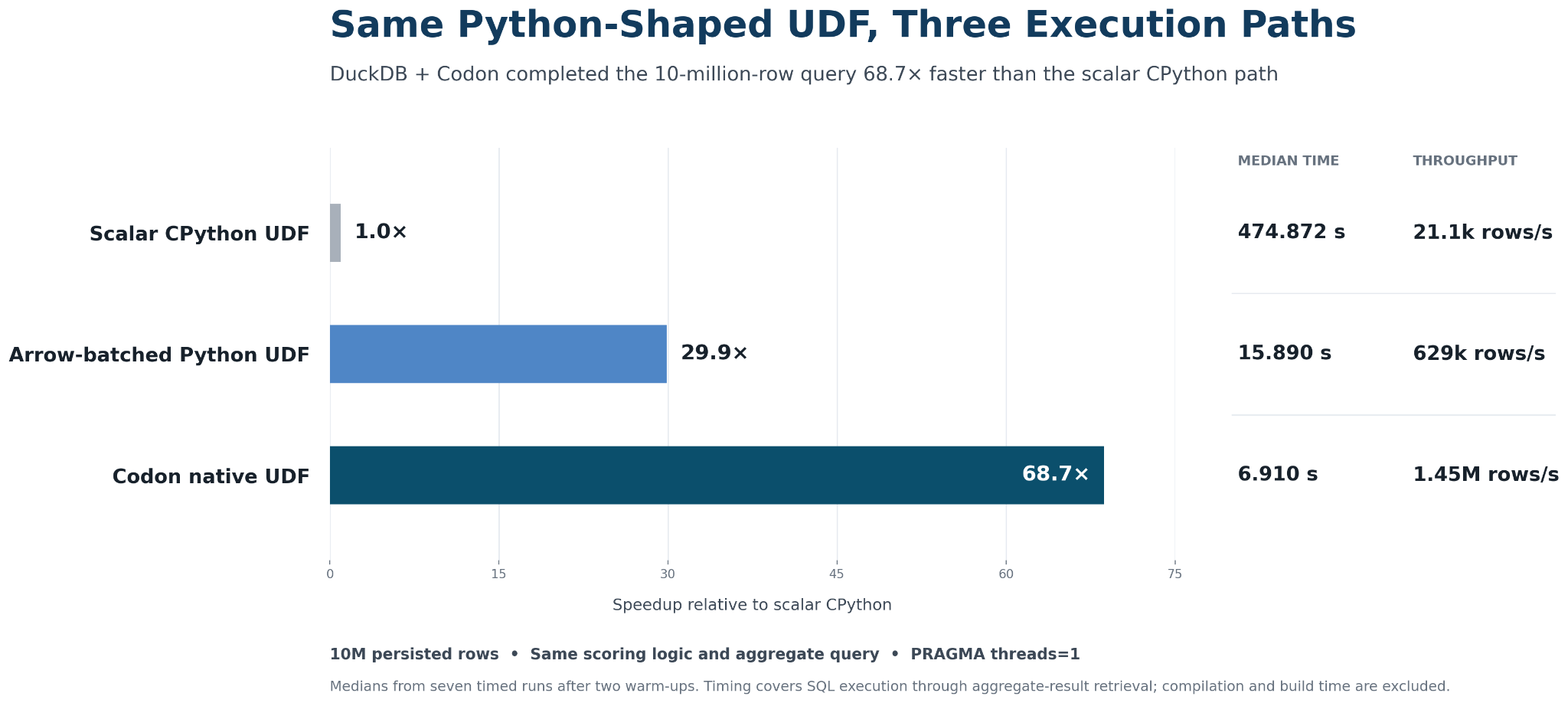
Here are the results:
What the Results Tell Us
The scalar CPython path took a median 474.9 seconds. Arrow batching reduced that to 15.9 seconds by amortizing the boundary across batches. The Codon-native path completed in 6.9 seconds: 68.7x faster than scalar CPython and about 2.3x faster than the Arrow-batched version in this environment.
The scalar result shows the cost of entering CPython once per row. Along with the scoring work, the query pays for scalar conversion, Python call dispatch, dynamic object semantics, reference counting, allocation, interpreter execution, and GIL-constrained Python work.
Arrow removes much of that crossing cost. If this computation could be expressed through native Arrow or NumPy kernels, Arrow might already be the right answer. Here, however, the custom recurrence still runs as a Python loop after each batch arrives.
Codon changes that last part. DuckDB still scans the table, reads validity masks and string metadata, invokes the function, executes the branches and byte processing, and writes the result. The 68.7x result is of course not translatable to all UDFs, but it shows how much this workload gained when the custom loop stopped executing through CPython.
Where This Boundary Pays Off
A Good Fit
The native path is most compelling when a hot UDF contains enough real computation to justify the function boundary: branch-heavy scoring, custom parsers, token or feature extraction, string processing, simulations, bespoke numerical logic, or transformations that do not map cleanly to SQL or Arrow kernels.
A Poor Fit
It is less useful for, say, x + 1. A trivial arithmetic UDF can be dominated by function-call and adapter overhead, while DuckDB's built-in operators will usually be better optimized. If the logic is naturally expressible as SQL, a DuckDB built-in, or a PyArrow kernel, it should stay there.
The practical question is not whether every Python UDF should move to Codon. It is whether a measured hot UDF contains custom logic that remains expensive after the obvious database and Arrow options have been considered.

From This Experiment to a Real Workload
We started with an ordinary Python UDF and changed how DuckDB executed it. Scalar CPython crossed the interpreter boundary once per row. Arrow reduced those crossings by batching rows. Codon Enterprise kept the same custom scoring logic but moved its loop out of the Python interpreter and into native code.
For this workload, Codon Enterprise reduced the median query time from 474.9 seconds to 6.9 seconds: 68.7x faster than scalar CPython and about 2.3x faster than the Arrow-batched Python path, where the custom recurrence still executed as Python control flow.
But there is an important gap between this experiment and a production integration.
The C++ adapter in this post is intentionally explicit so we can show exactly what happens at the DuckDB–Codon boundary. Even for this small example, however, it requires a substantial amount of plumbing: registering types and callbacks, accessing DuckDB vectors, handling validity masks, translating strings into Codon’s representation, managing ownership and lifetimes, and building and loading the native extension. A real integration also has to deal with cases we deliberately left out here, including errors and exceptions, additional data types, memory ownership, concurrency, and other database semantics.
That is useful machinery to understand, but it is not machinery application developers should have to write and maintain for every UDF.
Codon Enterprise includes a native DuckDB integration that handles this boundary automatically. It hides the C/C++ adapter layer and provides the infrastructure needed to run Codon-compiled UDFs inside DuckDB while handling the type conversions, lifetimes, errors, edge cases, and integration details that a production deployment requires. The goal is for developers to focus on the Python logic they want to accelerate, not on maintaining database extension plumbing around it.
The same broader problem appears in other data platforms as well: valuable application logic lives in Python, while the execution engine underneath it is designed around native code. Codon provides a path for bringing that logic into the engine’s native execution model without rewriting it in C++.
If Python UDFs or other custom Python logic are showing up in your database or data-platform workloads, reach out to us about running that logic at native speed without rewriting it in C or C++ with Codon Enterprise.
Authored by Ariya Shajii

Creator of Codon · Founder of Exaloop
Ariya co-founded Exaloop in late 2021 after completing his PhD in MIT’s Computer Science and AI Lab (CSAIL), focusing on the intersection between high-performance computing and computational genomics. He also holds a Master’s degree in computer science from MIT and a Bachelor of Science in computer engineering from Boston University.