
One of the long-standing gaps between Codon and Python has been Unicode support. Codon’s string type has historically been essentially a sequence of bytes without a concept of encoding. It was possible to create strings containing Unicode characters:
my_string = "🙂" # works in both Python and CodonHowever, Codon would simply represent this string as a series of bytes derived from the UTF-8 representation of the emoji character. This becomes apparent when, for example, inspecting the length of the string:
len(my_string)  # Python gives 1
                # Codon gives 4 in v0.19 and below
Why 4? Because that’s how many bytes are in the UTF-8 encoding:
my_string.encode() # b'\xf0\x9f\x99\x82'As of Codon 0.20, this is changing: Codon now includes feature-complete, native Unicode support for 1-to-1 Python compatibility. In this blog post, we’ll dig into the design, implementation, performance and even Unicode-specific compiler optimizations that are included in this release.
Representing Unicode data
The first major question to answer when designing a Unicode library is how to actually represent Unicode characters in memory. Of course, there are several widely-used Unicode encodings available, the most common of which is UTF-8. In fact, UTF-8 is the encoding Python uses by default when converting strings to and from bytes:
"hello".encode()  # b'hello'
"🙂".encode()      # b'\xf0\x9f\x99\x82'
UTF-8 has a lot going for it: it’s compact, ASCII-compatible, and ubiquitous. But it also has one property that makes it less convenient as an internal string representation: characters have variable width. A Unicode code point can occupy anywhere from one to four bytes.
In practice, that results in even simple operations like indexing no longer being constant-time. Consider:
s = "hello🙂world"
print(s[5])  # 🙂
If s is stored as UTF-8, finding s[5] requires figuring out where the sixth code point actually starts in the underlying byte sequence. In general, that means scanning through the preceding UTF-8 data (or maintaining an additional index alongside it).
That effectively disqualifies UTF-8 as the in-memory format if we want to support Python’s APIs efficiently. Indexing, slicing, etc. are very common operations, and we need them to be fast. Instead, Codon uses a representation inspired by CPython’s PEP 393 (Flexible String Representation). Each string selects the smallest fixed-width representation capable of storing all of its code points:
- ASCII: 1 byte per code point
- Latin-1: 1 byte per code point
- UCS-2: 2 bytes per code point
- UCS-4: 4 bytes per code point
So "hello" can be stored using only one byte per character, while "hello🙂" uses four. The important difference from UTF-8 is that, within any individual string, every code point has the same width. Indexing therefore remains a simple constant-time operation: once we know the string’s representation, s[i] is at a fixed offset from the start of the data buffer.
Beyond the actual encoded data, we need to store both the length of the string (in code points) and also the “kind” (i.e. whether the string is ASCII, Latin-1, etc.). In the Codon implementation, the length and kind are combined into a single 64-bit integer whose high byte encodes the kind, and whose low 7 bytes encode the length. Here’s an illustration of what this looks like for a couple example strings:
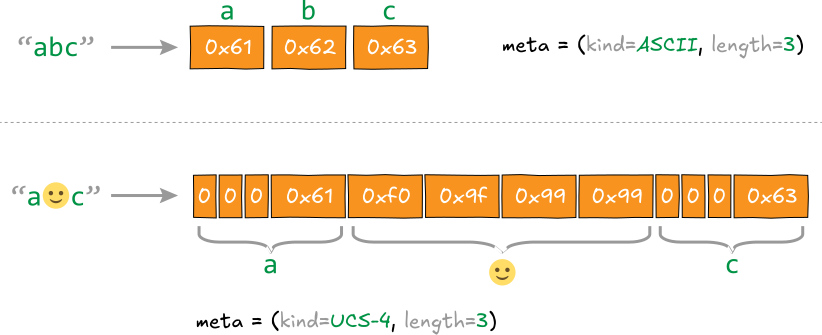
The str type in Codon is therefore simply a tuple (data_pointer, metadata) that’s passed around by value. In fact, this is even ABI-compatible with the original bytes-only representation!
This design trades a bit of additional runtime bookkeeping (and potentially extra memory usage for strings containing both ASCII and non-ASCII code points) for fast constant-time operations. Moreover, It also has another useful property: ASCII strings (the overwhelmingly common case in many workloads) remain particularly compact and cheap to operate on.
Working with Unicode
With this representation in place, most basic string operations become relatively straightforward. In particular, because every code point within a given string has the same width, accessing the ith character is just an appropriately-sized load:
# Codon implementation using low-level Ptr type

def _load_codepoint(self, i: int) -> int:
    kind = self._kind()

    if kind <= KIND_LATIN1:
        return int(self._ptr[i])

    if kind == KIND_UCS2:
        return int(Ptr[u16](self._ptr)[i])

    return int(Ptr[u32](self._ptr)[i])
This gives Codon constant-time indexing regardless of the contents of the string. For example:
s = "hello🙂world"
print(s[5])       # 🙂
print(ord(s[5]))  # 128578
Mixing representations
One subtlety is that two strings do not necessarily have the same internal representation. Consider:
a = "hello"
b = "héllo"
c = "hello🙂"
These use ASCII, Latin-1 and UCS-4 representations, respectively. String operations therefore need to work correctly even when their operands have different widths. Equality is a good example. If two strings have the same width, the implementation can simply compare their underlying memory:
if self._width() == other._width():
    return memcmp(
        self._ptr,
        other._ptr,
        len(self) * self._width(),
    ) == 0
If their widths differ, Codon instead compares them code point by code point. This distinction matters because the representation of a string is an implementation detail: two strings containing the same sequence of Unicode code points must compare equal regardless of how those code points happen to be stored.
The same principle extends throughout the implementation. Operations work in terms of Unicode code points while taking advantage of the underlying representation whenever possible.
Fast paths for the common case
There is another important benefit to keeping ASCII as a distinct representation: we know immediately when a string contains only ASCII. That lets many operations bypass the full Unicode machinery entirely. Case conversion, for example, starts with:
def lower(self):
    if self._is_ascii():
        return _unicode_ascii_map(self, _ascii_lower)
    return _unicode_lower_full(self)
Methods like upper(), casefold(), capitalize(), title() and the various character classification operations use similar ASCII fast paths. This is particularly useful because Unicode operations can be considerably more complicated than their ASCII counterparts. Changing the case of a Unicode character, for example, is not necessarily a matter of adding or subtracting a fixed value, or even replacing one code point with another. Some mappings can change the length of the string:
"straße".upper() # "STRASSE"Codon implements these full Unicode mappings while avoiding their overhead entirely when the string is known to contain only ASCII.
The pattern of providing full Python-compatible Unicode semantics, but specializing aggressively when the representation gives us more information, is used throughout the new string implementation. And, as we’ll see later, it also creates some interesting opportunities for the compiler itself.
Making Unicode fast
Correctness and Python compatibility were the primary goals of the new implementation, but performance was just as important. To that end, the string library itself uses specialized algorithms and SIMD where appropriate, while compiler passes can optimize higher-level string operations before they even reach the runtime.
SIMD string search
String search is a good example of the former. Operations like find(), rfind() and in ultimately need to locate one sequence of code points inside another:
text = "The quick brown 🦊 jumps over the lazy dog"
text.find("jumps")  # 18
A straightforward implementation would test the needle at each possible position in the string; as you can imagine, that would be far from optimal. CPython uses its “two-way” string-search algorithm, augmented with ideas from Boyer-Moore-Horspool. One of the key ideas behind this family of algorithms is that a mismatch can tell us something about where the next possible match can occur, allowing the search to skip ahead rather than testing every position.
Codon takes a different approach. Its implementation is based on a vectorized Rabin-Karp algorithm. Instead of trying to skip over portions of the string, we make checking candidate positions extremely cheap by checking many of them at once with SIMD.
For each block of the string being searched (the “haystack”), Codon loads vectors corresponding to the first and last code points of each possible match. It compares those vectors against the first and last code points of the search string (the “needle”), producing a bitmask of candidate positions:
haystack:  ... j x x x s ... j u m p s ...
               ↑     ↑       ↑       ↑
needle:        j ... s       j ... s

SIMD:        compare many possible starts at once
                       ↓
             candidate bitmask
                       ↓
             verify only candidates
Only positions where both comparisons succeed need a full comparison against the needle. In other words, the first and last code points act as a lightweight hash: most positions are rejected using just a pair of vector comparisons, while memcmp-based verification is reserved for the relatively small number of plausible matches.
This turns out to be much faster in practice on real-world data. As an example, let’s search for a particular string in the famous novel Moby-Dick by Herman Melville:
import time

# https://www.gutenberg.org/cache/epub/2701/pg2701.txt
with open('moby-dick.txt') as f:
    text = f.read()

t0 = time.time()
pos = text.find('It was a wondrous sight')
t1 = time.time()

print(f'Position:   {pos:,d}')
print(f'Time taken: {(t1 - t0)*1e6:.3g} microseconds')
Here are the results on Apple M1 Max with Python 3.14:
Python:
Position:   971,577
Time taken: 362 microseconds
Codon:
Position:   971,577
Time taken: 113 microseconds
That’s over 3x faster than Python's C-implemented string search! What’s interesting about this seemingly simple example is that the haystack (i.e. the text of Moby-Dick) actually contains non-ASCII Unicode characters, whereas our search string is in fact plain ASCII. Let’s see what happens if we strip away all non-ASCII characters from the text:
# Remove non-ASCII characters from text
text = text.encode("ascii", errors="ignore").decode("ascii")
Timings are as follows:
Python:
Position:   965,776
Time taken: 273 microseconds
Codon:
Position:   965,776
Time taken: 51 microseconds
In this case, Codon is a whopping 5.3x faster than Python. This is because in the pure ASCII case, our SIMD approach can operate on more characters in parallel than it can in the UCS-2 or UCS-4 cases; recall that the former needs only 1 byte per character, whereas the latter needs 2 or 4.
Fast encoding & decoding
Encoding and decoding are another important part of Unicode performance. Codon strings use the fixed-width representation described earlier, but the outside world generally speaks UTF-8: source files, text files, network data and many external libraries all commonly represent text this way.
That means operations such as:
data = "hello 🙂".encode("utf-8")
text = data.decode("utf-8")
require converting between UTF-8 and Codon’s internal representation.
The implementation again takes advantage of the string’s “kind”. ASCII is particularly simple: ASCII is already valid UTF-8, so encoding an ASCII string requires no character-by-character conversion. More generally, knowing whether the source consists of 8-, 16- or 32-bit code points lets Codon dispatch directly to a specialized encoder rather than handling every string through a generic Unicode path.
The UTF-8 implementation also uses SIMD for larger strings. For example, when encoding UCS-4 data, Codon examines blocks of code points at once to quickly identify all-ASCII regions. Those blocks can be packed directly into the output, while only blocks containing non-ASCII code points need to go through the full variable-length UTF-8 encoding logic.
Let’s take the same Moby-Dick text and run encoding on it:
import time

with open('moby-dick.txt') as f:
    text = f.read()

t0 = time.time()
text = text.encode()
t1 = time.time()

print(f'Length:     {len(text):,d}')
print(f'Time taken: {(t1 - t0)*1e6:.3g} microseconds')
Here are the timings:
Python:
Length:     1,253,949
Time taken: 769 microseconds
Codon:
Length:     1,253,949
Time taken: 364 microseconds
So Codon’s SIMD encoder is over 2x faster in this case. Decoding follows the same philosophy: common ASCII runs can be handled in bulk, with the more expensive Unicode decoding logic reserved for the portions of the input that actually need it.
This matters because encoding and decoding often sit on hot I/O boundaries. Reading a large text file, for example, shouldn’t require paying the full cost of general Unicode processing for megabytes of ordinary ASCII. The implementation therefore keeps the fully general path available while making the overwhelmingly common cases as cheap as possible.
Compiler-optimized formatting
There is another optimization available to Codon that is harder to take advantage of in a traditional interpreter runtime like Python’s: sometimes we can avoid doing string-related work at runtime altogether.
Consider formatting:
name = "Alice"
score = 93.456

print("{} scored {:.1f}%".format(name, score))
Normally, str.format() has to parse the format string at runtime. It must identify literal portions and replacement fields, parse each field’s format specification, resolve the arguments, and finally format and concatenate the resulting pieces.
But in this example the format string is a compile-time constant. Parsing it every time the expression executes is unnecessary.
Codon 0.20 includes a compiler IR pass specifically for this case. When it encounters a constant format string, the compiler parses the formatting expression during compilation. It resolves the fields and their types and replaces the generic formatting operation with specialized calls containing the already-parsed formatting parameters.
Conceptually, something like:
"{} scored {:.1f}%".format(name, score)can become roughly:
concatenate(
    format_string(name),
    " scored ",
    format_float(score, precision=1, conversion='f'),
    "%"
)
The actual transformation happens in Codon’s intermediate representation, so by the time the program reaches LLVM there is no format string left to parse. Details such as width, precision, alignment, fill character, grouping, conversion and flags have become constants in the generated code.
The optimization goes beyond simple positional fields as well. The pass can resolve tuple indexing and attribute access in expressions such as:
"{0.name}: {1:.2f}".format(obj, value)and direct __format__() calls with constant specifications receive the same treatment.
If a format expression cannot be safely resolved at compile time (for example, because the format string itself is dynamic) Codon simply falls back to the normal runtime implementation.
This distinction is important. Native Unicode support in Codon isn’t just a new string library. Because strings are implemented in Codon and flow through the same compiler infrastructure as the rest of a program, high-level Python string operations become candidates for compiler optimization too.
That gives us two complementary ways to make Unicode fast: optimize the operations that genuinely have to happen at runtime, and move everything else out of runtime entirely.
Performance
Microbenchmarks
Let’s expand on the Moby-Dick example for several additional string operations and measure performance against CPython. Here are the results on Apple M1 Max:
Across the microbenchmarks, Codon is faster than CPython on nearly every string operation, often by several times and occasionally by more than an order of magnitude. The largest gains appear in operations such as stripping, prefix/suffix checks, searching and splitting, while lower-level operations like concatenation, repetition, joining and equality are much closer to parity. Encoding and decoding are also relatively close, which is expected given that CPython already implements these routines in optimized native code. Overall, the results show that the new Unicode implementation is not just compatible with Python, it is competitive at the primitive-operation level, while still benefiting from Codon’s end-to-end compilation in larger applications, as we’ll see next.
Application-level performance
So what does all of this mean for an actual Unicode-heavy application?
To find out, let’s implement a BERT-style WordPiece tokenizer and run it over a multilingual Wikipedia corpus containing roughly 85 million Unicode characters. The tokenizer performs many of the operations discussed above: UTF-8 decoding, iteration over Unicode code points, character classification, slicing, string construction, dictionary lookups and repeated WordPiece matching. Here’s the code:
import sys
import time


MAX_INPUT_CHARS_PER_WORD = 100


def load_vocab(path):
    vocab = {}
    with open(path, encoding="utf-8") as f:
        for token_id, line in enumerate(f):
            vocab[line.rstrip("\n")] = token_id
    return vocab


# ---------------------------------------------------------------------------
# Basic tokenizer
# ---------------------------------------------------------------------------

def is_whitespace(c):
    if c == " " or c == "\t" or c == "\n" or c == "\r":
        return True
    return c.isspace()


def is_control(c):
    # BERT treats tab/newline/carriage return as whitespace rather than
    # control characters.
    if c == "\t" or c == "\n" or c == "\r":
        return False

    cp = ord(c)

    # Unicode C0/C1 control ranges. This covers the control characters that
    # occur in ordinary text without requiring unicodedata.category().
    return cp < 32 or 127 <= cp <= 159


def is_punctuation(c):
    cp = ord(c)

    # ASCII punctuation.
    if (
        33 <= cp <= 47
        or 58 <= cp <= 64
        or 91 <= cp <= 96
        or 123 <= cp <= 126
    ):
        return True

    # Common Unicode punctuation blocks.
    return (
        0x2000 <= cp <= 0x206F
        or 0x2E00 <= cp <= 0x2E7F
        or 0x3000 <= cp <= 0x303F
        or 0xFE10 <= cp <= 0xFE1F
        or 0xFE30 <= cp <= 0xFE4F
        or 0xFF00 <= cp <= 0xFF65
    )


def is_chinese_char(c):
    cp = ord(c)

    # Same CJK ranges checked by BERT's BasicTokenizer.
    return (
        0x4E00 <= cp <= 0x9FFF
        or 0x3400 <= cp <= 0x4DBF
        or 0x20000 <= cp <= 0x2A6DF
        or 0x2A700 <= cp <= 0x2B73F
        or 0x2B740 <= cp <= 0x2B81F
        or 0x2B820 <= cp <= 0x2CEAF
        or 0xF900 <= cp <= 0xFAFF
        or 0x2F800 <= cp <= 0x2FA1F
    )


def clean_text(text):
    out = []

    for c in text:
        cp = ord(c)

        # Invalid/replacement characters are discarded by BERT.
        if cp == 0 or cp == 0xFFFD or is_control(c):
            continue

        if is_whitespace(c):
            out.append(" ")
        else:
            out.append(c)

    return "".join(out)


def tokenize_chinese_chars(text):
    out = []

    for c in text:
        if is_chinese_char(c):
            out.append(" ")
            out.append(c)
            out.append(" ")
        else:
            out.append(c)

    return "".join(out)


def whitespace_tokenize(text):
    text = text.strip()
    if not text:
        return []
    return text.split()


def split_on_punctuation(token):
    if not token:
        return []

    result = []
    current = []

    for c in token:
        if is_punctuation(c):
            if current:
                result.append("".join(current))
                current = []

            result.append(c)
        else:
            current.append(c)

    if current:
        result.append("".join(current))

    return result


def basic_tokenize(text):
    # bert-base-multilingual-cased:
    #   do_lower_case = False
    #   tokenize_chinese_chars = True
    #   strip_accents = False

    text = clean_text(text)
    text = tokenize_chinese_chars(text)

    orig_tokens = whitespace_tokenize(text)
    split_tokens = []

    for token in orig_tokens:
        split_tokens.extend(split_on_punctuation(token))

    return whitespace_tokenize(" ".join(split_tokens))


# ---------------------------------------------------------------------------
# WordPiece
# ---------------------------------------------------------------------------

def wordpiece_tokenize(token, vocab, unk_id):
    chars = token

    if len(chars) > MAX_INPUT_CHARS_PER_WORD:
        return [unk_id]

    result = []
    start = 0

    while start < len(chars):
        end = len(chars)
        match_id = -1
        match_end = start

        while start < end:
            piece = chars[start:end]

            if start > 0:
                piece = "##" + piece

            if piece in vocab:
                match_id = vocab[piece]
                match_end = end
                break

            end -= 1

        if match_id == -1:
            return [unk_id]

        result.append(match_id)
        start = match_end

    return result


# ---------------------------------------------------------------------------
# Full tokenizer
# ---------------------------------------------------------------------------

def tokenize(text, vocab):
    unk_id = vocab["[UNK]"]
    cls_id = vocab["[CLS]"]
    sep_id = vocab["[SEP]"]

    ids = [cls_id]

    for token in basic_tokenize(text):
        ids.extend(wordpiece_tokenize(token, vocab, unk_id))

    ids.append(sep_id)

    return ids


# ---------------------------------------------------------------------------
# Benchmark
# ---------------------------------------------------------------------------

def process_file(path, vocab):
    total_lines = 0
    total_chars = 0
    total_tokens = 0
    checksum = 0

    with open(path, encoding="utf-8") as f:
        for line in f:
            text = line.rstrip("\n")

            ids = tokenize(text, vocab)

            total_lines += 1
            total_chars += len(text)
            total_tokens += len(ids)

            # Make sure the tokenizer output is actually consumed.
            for token_id in ids:
                checksum += token_id

    return total_lines, total_chars, total_tokens, checksum


def main():
    if len(sys.argv) != 3:
        print(f"usage: {sys.argv[0]} VOCAB INPUT")
        sys.exit(1)

    vocab_path = sys.argv[1]
    input_path = sys.argv[2]

    vocab = load_vocab(vocab_path)
    start = time.time()
    lines, chars, tokens, checksum = process_file(input_path, vocab)
    elapsed = time.time() - start

    print(f"time:      {elapsed:.3f}s")
    print(f"lines:     {lines}")
    print(f"chars:     {chars}")
    print(f"tokens:    {tokens}")
    print(f"checksum:  {checksum}")

    if elapsed > 0:
        print(f"Mchars/s:  {chars / elapsed / 1e6:.2f}")
        print(f"Mtokens/s: {tokens / elapsed / 1e6:.2f}")


main()
Running this application in both CPython and Codon, we see:
                         CPython       Codon
Time                     101.87 s      14.06 s
Character throughput       0.84 M/s     6.05 M/s
Token throughput           0.35 M/s     2.53 M/s
Both versions processed 1,023,502 lines and produced exactly 35,610,581 tokens with the same checksum. Codon completed the workload in 14.1 seconds versus 101.9 seconds for CPython: a 7.2x speedup.
Now, that doesn’t mean that Codon’s Unicode primitives are themselves 7x faster than CPython’s. In fact, many of Python’s string operations are already implemented in highly optimized native C.
Instead, this benchmark demonstrates what native Unicode support enables at the application level. Tokenization consists of much more than calls into a string library: there are loops over characters, branches for different character classes, repeated substring operations, dictionary lookups and the greedy WordPiece algorithm itself. In CPython, the individual string primitives may execute in native code, but the application logic connecting them is still interpreted. Codon compiles the entire pipeline together.
This was one of the main motivations for implementing Unicode directly in Codon. Previously, Python code that depended on proper Unicode semantics could not simply be compiled and expected to behave the same way. With Codon 0.20, workloads like this tokenizer can retain their natural Python implementation, including full Unicode processing, while the whole application is compiled to native code.
And because the underlying string operations are themselves designed for compiled code (with fixed-width representations, SIMD search and encoding/decoding fast paths), the Unicode layer does not have to become a bottleneck as the surrounding Python code gets faster.
In this example, that translates to processing multilingual text at 6 million characters and 2.5 million BERT tokens per second, from the same Python source.
Wrapping up
Unicode support has been one of the largest remaining compatibility gaps between Codon and Python. With Codon 0.20, that gap is effectively closed: strings now have full Unicode semantics while retaining the performance characteristics we want from a compiled language.
Building this required more than simply adding a UTF-8 decoder. The new implementation includes a flexible internal representation, optimized Unicode operations, SIMD-accelerated search and encoding/decoding, and compiler-level optimizations for operations like string formatting. The result is a string implementation designed from the ground up for both Python compatibility and native execution.
More importantly, it means Unicode-heavy Python applications can now be compiled with Codon without changing how they represent or process text. As the BERT tokenizer example shows, that opens up a much broader class of real-world workloads—from NLP and data processing to parsing and text analytics—that can benefit from compiling Python end-to-end.
Unicode support will be available in Codon 0.20. Give it a try, and let us know what you build!